


 Tools for Jira
 Tools for monday.com


Smart Checklist vs Jira Action Items
Jira action items are useful for quick checkboxes in descriptions and comments. Smart Checklist is built for recurring Jira work that needs owners, dates, reusable templates, automation, JQL visibility, and audit-ready history.


Plugin or Jira native functionality?
Compare what suits your team better: 3rd party Checklist apps or Jira built-in solution
| Made to | Smart Checklist | Jira action items |
|---|---|---|
| Try for Free | ||
| Create detail-rich to-do lists in Jira issues and JSM requests | Yes | Yes |
| Add statuses to checklist items (e.g. "In Progress", "Skipped", "Passed") | Yes | No |
| Add assignees, due dates, and priorities to checklist items | Yes | No |
| Save checklists as templates to automate recurring tasks in Jira | Yes | No |
| Automatically add checklist templates based on issue type, field values or workflow transition | Yes | No |
| Add mandatory/required checklist items | Yes | No |
| Validate checklist completion before issue transition with Jira workflow integration | Yes | No |
| Convert checklist item to Jira issue or subtask | Yes | No |
| Track progress with a Jira checklists completion bar and dashboard gadgets | Yes | No |
| Search checklist progress and statuses with JQL | Yes | No |
| Control checklist visibility and editing permissions | Yes | No |


Learn more about Jira action items functionality here
Native Jira Functionality
Jira action items
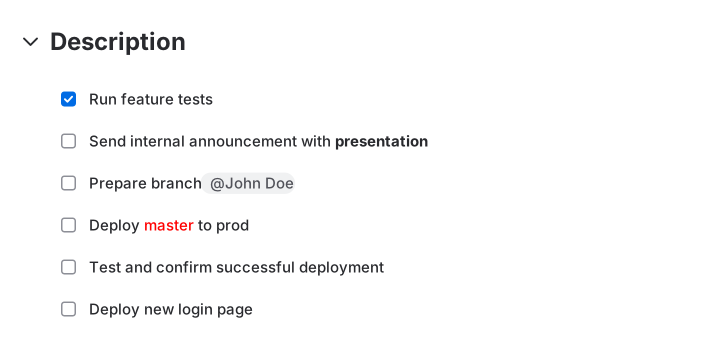
Jira action items are inline checkboxes added to rich text areas such as descriptions, comments, and Jira service management requests. They help teams record small tasks without creating separate subtasks.
More Smart Tools – Less Manual Work
Smart Checklist
for Jira
Make project management easier with simple ToDo lists. Save checklists as templates and use checklist automation to save time. Set up built-in automation rules or Jira automation to create and update checklists automatically. Smart Checklist for Jira is a flexible checklist plugin by titanapps for Jira cloud and data center.
Visit Atlassian Marketplace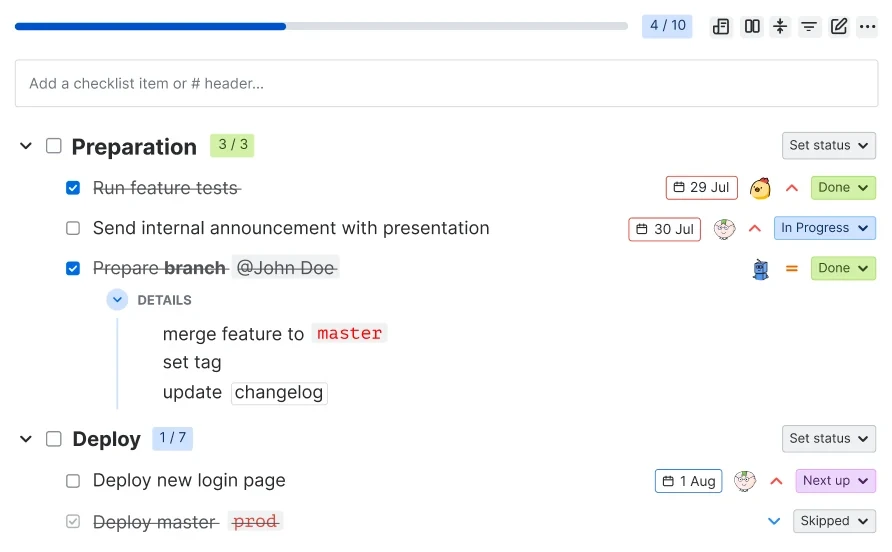
Where Smart Checklist for Jira app fits best
IT and Engineering
Give your Engineering team a peace of mind with well defined processes, a space to handle implementation plans, and own ToDos.

Product and Management
Free your Management team from routine, repetitive tasks and let them focus on things that move projects further.

HR and Recruiting
Automatically add checklists to all HR’s Jira tickets to maximize the team’s efficiency and reduce human errors.

Marketing
Turn your Marketing tasks into clear step-by-step action plans. Create your own checklists, save them as templates to streamline regular activities.

Finance
Forget about overdue payments and missed tax declaration. Enhance all financial processes with clear, step-by-step action plans no one can mess up.

IT and Engineering
Give your Engineering team a peace of mind with well defined processes, a space to handle implementation plans, and own ToDos.

Product and Management
Free your Management team from routine, repetitive tasks and let them focus on things that move projects further.

HR and Recruiting
Automatically add checklists to all HR’s Jira tickets to maximize the team’s efficiency and reduce human errors.

Marketing
Turn your Marketing tasks into clear step-by-step action plans. Create your own checklists, save them as templates to streamline regular activities.

Finance
Forget about overdue payments and missed tax declaration. Enhance all financial processes with clear, step-by-step action plans no one can mess up.

Why Jira Action Items Struggle in Operational and Agile Workflows
No structured ownership
A mention can alert a teammate, but it does not turn the checkbox into assigned work with a clear owner and follow-through path.
No deadline control
Action items cannot carry due dates, which makes them weak for release approvals, payment reviews, onboarding tasks, and time-sensitive checks.
No automation
Native action items can’t reliably be automated or used to validate workflow transitions.
No cross-issue visibility
Managers can’t easily track checklist progress, completion rates, or process adherence when action items are buried in rich text fields.


Need more than a Jira checkbox?
Use Smart Checklist to turn repeatable work into trackable Jira checklists with owners, due dates, templates, automation, workflow validation, and visibility across projects.
Why choose tools by TitanApps

- Runs on Atlassian
- SOC 2, GDPR Compliant
- Lightweight user-friendly interface
- Constant Product Development
- Detail-rich Documentation
- Expert Support
- Cloud Migration Assistance
- Partner Program Benefits
- Integrates with automation for Jira, Jira workflows, REST API, and Rovo Agent

Community ❤️ Smart Tools


Frequently Asked Questions 🤔
Haven't found an answer? Try our blog or contact support
Jira action items are inline checkboxes added to rich text areas such as descriptions, comments, and Jira Service Management requests. They help teams record small tasks without creating separate subtasks. Learn more in our guide to Jira action items.
Jira action items are useful for quick checkboxes in descriptions and comments. Smart Checklist is built for recurring Jira work that needs owners, due dates, statuses, reusable templates, automation, workflow validation, JQL search, and visibility across projects.
No. A mention can alert a teammate, but it does not turn the checkbox into assigned work, and action items cannot carry due dates. With Smart Checklist, you can add assignees, due dates, priorities, and custom statuses to every checklist item.
No. Native action items can’t reliably be automated or used to validate workflow transitions. Smart Checklist supports mandatory items and workflow validation, so a work item (issue) can’t move forward until the required checklist items are completed.
No. Action items live inside rich text fields, so managers can’t easily track progress or completion rates across work items (issues). Smart Checklist lets you search checklist progress and statuses with JQL and track progress with a completion bar and dashboard gadgets.
Jira action items work well for quick, one-off checkboxes in a description or comment. If the same steps repeat across work items (issues), need an owner and a deadline, or must be completed before a transition, Smart Checklist templates and automation are a better fit.
Smart Checklist is a Jira add-on that allows you to include to-do lists in your Jira tickets. You can also create checklist templates for recurring tasks. They will be automatically added to a work item (issue) based on your triggers and criteria.
Yes, you can save your checklists and use them as templates. A Jira checklist template will be added to an issue based on your triggers and criteria. Check how this functionality works on Data Center and Cloud instances.
Pricing for the Paid version depends on the amount of users. You can check the pricing of our checklist for Jira Cloud here.
While Smart Checklist Paid version is available on Jira Cloud and Data Center, Smart Checklist FREE is only available on Jira Cloud.
You’ll need admin or system admin permissions to install Smart Checklist. You can install it directly from the Atlassian Marketplace.